
+새 프로젝트에서 웹서블렛 추가가 안될 때. (서버 연결 안됨)
import jakarta.servlet.annotation.WebServlet;
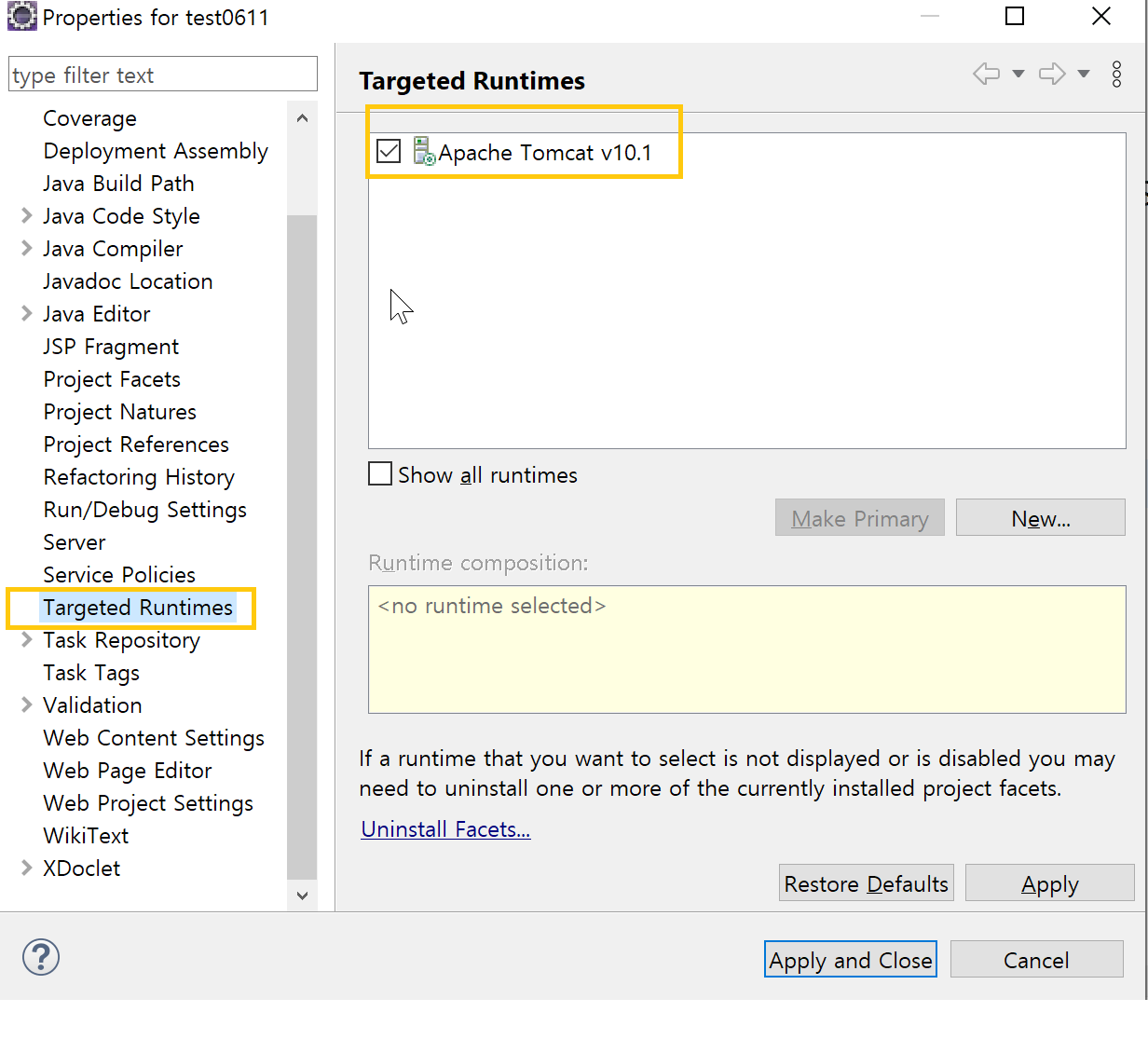
웹서블릿을 눌러도 이런 게 안 뜰 때.
1. Targeted Runtimes 확인
- 프로젝트 우클릭 → Properties
- 왼쪽에서 Targeted Runtimes 선택
- Tomcat 체크 → Apply and Close
- 만약 톰캣이 안 보이면, 이클립스에 톰캣 등록부터 해야 함.
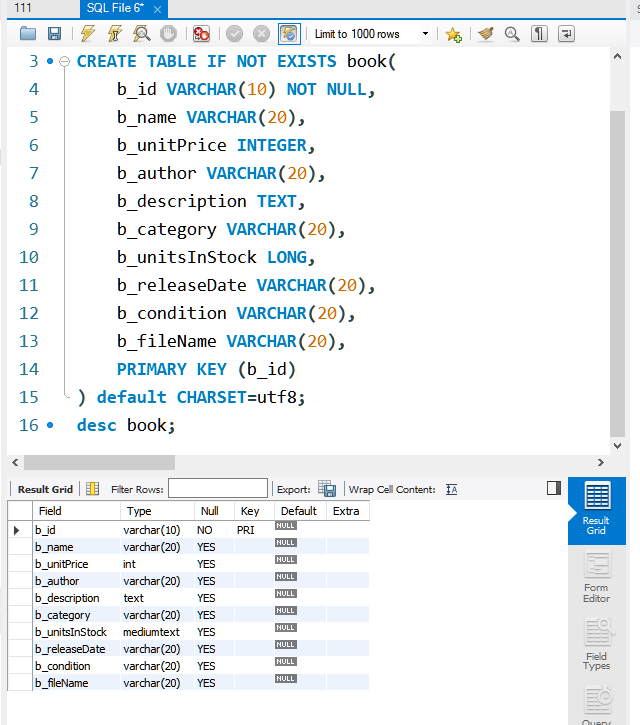
북마켓DB SQL에서 만들기
CREATE DATABASE IF NOT EXISTS BookMarketDB;
USE BookMarketDB;
CREATE TABLE IF NOT EXISTS book(
	b_id VARCHAR(10) NOT NULL,
	b_name VARCHAR(20),
	b_unitPrice INTEGER,
	b_author VARCHAR(20),
	b_description TEXT,
    b_publisher VARCHAR(20),
	b_category VARCHAR(20),
	b_unitsInStock INT,
	b_releaseDate VARCHAR(20),
	b_condition VARCHAR(20),
	b_fileName VARCHAR(20),
	PRIMARY KEY (b_id)
) default CHARSET=utf8;
desc book;
한줄씩 구동하고 마지막 줄까지 하면 이렇게 뜸.

커넥터jar 파일 넣어줌 WEB-INF -> lib 에.

_
JSP
<!-- testdb.jsp -->
<%@ page language="java" contentType="text/html; charset=UTF-8"
    pageEncoding="UTF-8"%>
 <%@ page import="java.sql.*" %>
<!DOCTYPE html>
<html>
<head>
<meta charset="UTF-8">
<title></title>
</head>
<body>
<!-- 데이터 베이스 연결 -->

	<%
		   Connection conn = null;
			//데이터베이스위치
			String url="jdbc:mysql://localhost:3306/BookmarketDB";
			//접속 id
			String user="root";
			//접속 패스워드
			String pw="1234";


			//데이터 연결하는 코드 두 줄이고 변하지 않는다.
			Class.forName("com.mysql.jdbc.Driver");
			conn = DriverManager.getConnection(url,user,pw);

			if(conn==null){
			    System.out.println("데이터베이스가 연결 X");
			}
			else{
			    System.out.println("데이터베이스가 연결 O");
			}

   %>
</body>
</html>
<!-- testdb_req.jsp -->
<%@ page language="java" contentType="text/html; charset=UTF-8"
    pageEncoding="UTF-8"%>
<!DOCTYPE html>
<html>
<head>
<meta charset="UTF-8">
<title>Insert title here</title>
</head>
<body>
  <form method="POST" action="testdb.jsp">
      <p> 아이디 : <input type="text" name="id">
      <p> 패스워드 : <input type="text" name="passwd">
      <p> 이름 : <input type="text" name="name">
      <p> <input type="submit" value="send">

  </form>

</body>
</html>
testdb에 코드 몇 줄을 더 추가한다
<!-- testdb.jsp -->
<%@ page language="java" contentType="text/html; charset=UTF-8"
    pageEncoding="UTF-8"%>
 <%@ page import="java.sql.*" %>
<!DOCTYPE html>
<html>
<head>
<meta charset="UTF-8">
<title></title>
</head>
<body>
<!-- 데이터 베이스 연결 -->

	<%
		   Connection conn = null;
			//데이터베이스위치
			String url="jdbc:mysql://localhost:3306/BookmarketDB";
			//접속 id
			String user="root";
			//접속 패스워드
			String pw="1234";


			//데이터 연결하는 코드 두 줄이고 변하지 않는다.
			Class.forName("com.mysql.jdbc.Driver");
			conn = DriverManager.getConnection(url,user,pw);

			if(conn==null){
			    System.out.println("데이터베이스가 연결 X");
			}
			else{
			    System.out.println("데이터베이스가 연결 O");
			}

			String id = request.getParameter("id");
			String password = request.getParameter("passwd");
			String name = request.getParameter("name");

			 System.out.println(id);
			 System.out.println(password);
			 System.out.println(name);

   %>
</body>
</html>
string오타는 나중에 고침..

이걸 복사해온다.
SQL
CREATE DATABASE IF NOT EXISTS BookMarketDB;
USE BookMarketDB;
CREATE TABLE IF NOT EXISTS book(
	b_id VARCHAR(10) NOT NULL,
	b_name VARCHAR(20),
	b_unitPrice INTEGER,
	b_author VARCHAR(20),
	b_description TEXT,
    b_publisher VARCHAR(20),
	b_category VARCHAR(20),
	b_unitsInStock INT,
	b_releaseDate VARCHAR(20),
	b_condition VARCHAR(20),
	b_fileName VARCHAR(20),
	PRIMARY KEY (b_id)
) default CHARSET=utf8;
desc book;

INSERT INTO book VALUES('ISBN1234', 'C# 프로그래밍', 27000, '우재남','C#을 처음 접하는 독자를 대상으로 일대일 수업처럼 자세히 설명한 책이다. 꼭 알아야 할 핵심 개념은 기본 예제로 최대한 쉽게 설명했으며, 중요한 내용은 응용 예제, 퀴즈, 셀프 스터디, 예제 모음으로 한번 더 복습할 수 있다.', '한빛아카데미', 'IT모바일', 1000,  '2022/10/06', 'new', 'ISBN1234.jpg');
INSERT INTO book VALUES('ISBN1235', '자바마스터', 30000, '송미영', '자바를 처음 배우는 학생을 위해 자바의 기본 개념과 실습 예제를 그림을 이용하여 쉽게 설명합니다. 자바의 이론적 개념→기본 예제→프로젝트 순으로 단계별 학습이 가능하며, 각 챕터의 프로젝트를 실습하면서 온라인 서점을 완성할 수 있도록 구성하였습니다.', '한빛아카데미', 'IT모바일',1000, '2023/01/01', 'new', 'ISBN1235.jpg');
INSERT INTO book VALUES('ISBN1236', '파이썬 프로그래밍', 30000, '최성철', '파이썬으로 프로그래밍을 시작하는 입문자가 쉽게 이해할 수 있도록 기본 개념을 상세하게 설명하며, 다양한 예제를 제시합니다. 또한 프로그래밍의 기초 원리를 이해하면서 파이썬으로 데이터를 처리하는 기법도 배웁니다.', '한빛아카데미', 'IT모바일', 1000, '2023/01/01', 'new', 'ISBN1236.jpg');

select * from book;

create table Member (
	id varchar(20) not null,
    passwd varchar(20),
    name varchar(30),
    primary key(id)
);

insert into member(id, passwd, name) values("id","password","name");
select * from member;
순서 : 데이터베이스 접속.

이 뒤에 jsp코드 수정함
// 데이터베이스에 전달할명령어
String sql="insert into member(id, passwd, name) values('id','password','name')";
_____
정상적인 구문
여기까지가 문자열

변수 앞뒤로 +를 붙여준다. +변수+
이렇게.
"','" <- 쉼표를 덧붙여준다.
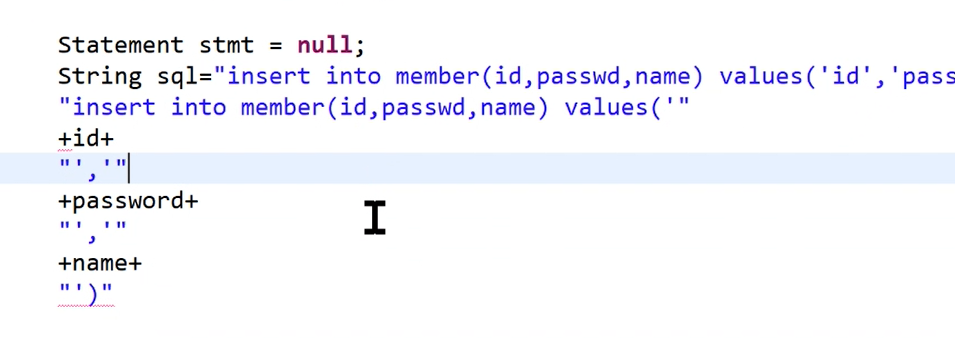
변수처리가 되면 잘라줘야한다.
sql을 완성시키고 이게 동작하는지 확인한 뒤
저걸 잘라서 SQL로 가져가서 구동한다.
<!-- testdb.jsp -->
<%@ page language="java" contentType="text/html; charset=UTF-8"
    pageEncoding="UTF-8"%>
 <%@ page import="java.sql.*" %>
<!DOCTYPE html>
<html>
<head>
<meta charset="UTF-8">
<title></title>
</head>
<body>
<!-- 데이터 베이스 연결 -->

	<%
		   Connection conn = null;
			//데이터베이스위치
			String url="jdbc:mysql://localhost:3306/BookmarketDB";
			//접속 id
			String user="root";
			//접속 패스워드
			String pw="1234";


			//데이터 연결하는 코드 두 줄이고 변하지 않는다.
			Class.forName("com.mysql.jdbc.Driver");
			conn = DriverManager.getConnection(url,user,pw);

			if(conn==null){
			    System.out.println("데이터베이스가 연결 X");
			}
			else{
			    System.out.println("데이터베이스가 연결 O");
			}
			   %>

	<%

	//원래 <%분리 안해도 되는데 헷갈리지 말라고 분리함

	//파라미터 받아서 데이터베이스에 넣은 것
			String id = request.getParameter("id");
			String password = request.getParameter("passwd");
			String name = request.getParameter("name");

			 System.out.println(id);
			 System.out.println(password);
			 System.out.println(name);

			 Statement stmt = null;

			//항상 sql을 완성시키고 워크벤치에서 테스트하고 변수처리한다.
			 String sql="insert into member(id, passwd, name) values('"+id+"','"+password+"','"+name+"')";

			stmt=conn.createStatement();
			stmt.executeUpdate(sql);
			 //
	%>
</body>
</html>
String sql="insert into member(id, passwd, name) values('"+id+"','"+password+"','"+name+"')";
stmt=conn.createStatement();
stmt.executeUpdate(sql);
이 두 줄이 추가되었다. 그리고 form이 있는 화면( testdb.jsp)에서 서버를 돌리고
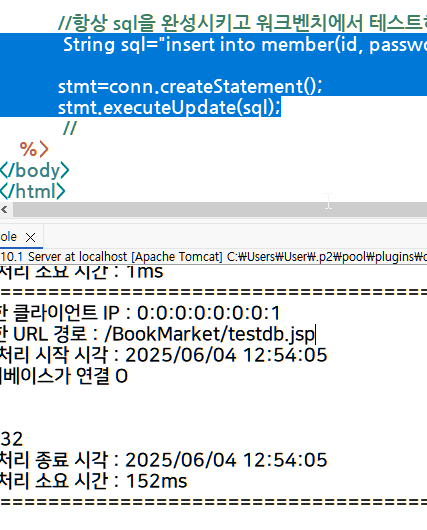
콘솔이 찍힌 걸 확인한 뒤
SQL로 가서

select 부분을 한줄 구동시키면 (이 위에 있던 건 앞 과정에서 이미 구동을 시켰다.)

이렇게 정보를 받아온 것을 볼 수 있다. (SQL 화면임)
PreparedStatement로 객체 접근하기 (563p)
	<%
			PreparedStatement pstmt = null;
	 		String sql2="insert into member(id, passwd, name) values(?,?,?)";
			pstmt = conn.prepareStatement(sql2);
			pstmt.setString(1,id);
			pstmt.setString(2,password);
			pstmt.setString(3,name);

			pstmt.executeUpdate();
	%>

<%
while(rs.next()){
String id = rs.getString("id");
String passwd = rs.getString("passwd");
String name = rs.getString("name");
}
%>
next를 이용해서 한 행씩 넘어감.
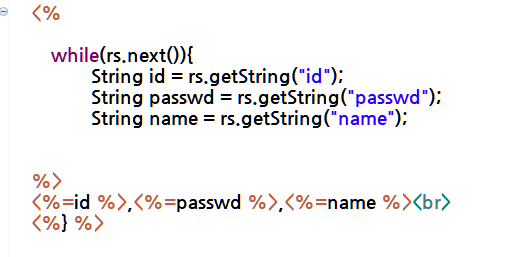
결과를 보면,

원본
웹앱
<?xml version="1.0" encoding="UTF-8"?>
<web-app version="6.0" xmlns="https://jakarta.ee/xml/ns/jakartaee"   xmlns:xsi="http://www.w3.org/2001/XMLSchema-instance"  xsi:schemaLocation="https://jakarta.ee/xml/ns/jakartaee https://jakarta.ee/xml/ns/jakartaee/web-app_6_0.xsd">
	<security-role>
        <role-name>admin</role-name>
    </security-role>
    <security-constraint>
    	<display-name>BookMarket Security</display-name>
        <web-resource-collection>
            <web-resource-name>BookMarket</web-resource-name>
            <description></description>
            <url-pattern>/addBook.jsp</url-pattern>
            <http-method>GET</http-method>
            <http-method>POST</http-method>
        </web-resource-collection>
        <auth-constraint>
        	<description>권한관리자명</description>
            <role-name>admin</role-name>
        </auth-constraint>
    </security-constraint>
    <login-config>
    <auth-method>FORM</auth-method>
    <form-login-config>
        <form-login-page>/login.jsp</form-login-page>
        <form-error-page>/login_failed.jsp</form-error-page>
    </form-login-config>
	</login-config>
	<error-page>
		<error-code>404</error-code>
		<location>/exceptionNoPage.jsp</location>
	</error-page>
	<filter>
 	   <filter-name>LogFilter</filter-name>
  	  <filter-class>filter.LogFilter</filter-class>
	</filter>
	<filter-mapping>
		<filter-name>LogFilter</filter-name>
		<url-pattern>/*</url-pattern>
	</filter-mapping>
	<filter>
	 	   <filter-name>LogFileFilter</filter-name>
	  	  <filter-class>filter.LogFileFilter</filter-class>
		<init-param>
			<param-name>filename</param-name>
			<param-value>c:\\logs\\bookmarket.log</param-value>
		</init-param>
	</filter>
	<filter-mapping>
		<filter-name>LogFileFilter</filter-name>
		<url-pattern>/*</url-pattern>
	</filter-mapping>
	<welcome-file-list>
        <welcome-file>welcome.jsp</welcome-file>
    </welcome-file-list>
</web-app>일단 원본 넣어둠
'JSP' 카테고리의 다른 글
| CRUD 프로젝트 (0) | 2025.06.05 |
|---|---|
| CRUD(Create, Read, Update, Delete) 1 (0) | 2025.06.04 |
| mysql 8.0.33 설치환경 구축 (0) | 2025.06.02 |
| 6월 2일 시험준비 (0) | 2025.06.02 |
| JSP 출력 <%= %> ${ } out.print(); (0) | 2025.05.30 |